Getting Started
Install the LEASH App
Open this page on your phone to install LEASH as an app.
Why install LEASH?
LEASH is a Progressive Web App (PWA). Installing it to your home screen gives you:
- Push notifications — never miss a task, tribute, or message
- Fullscreen mode — no browser bars, feels like a native app
- Instant access — tap the icon on your home screen, no searching through bookmarks
Install on iPhone / iPad (iOS)
- Open Safari and go to app.myleash.app
- Tap the Share button (the square with an upward arrow) at the bottom of the screen
- Scroll down and tap "Add to Home Screen"
- Tap "Add" in the top-right corner
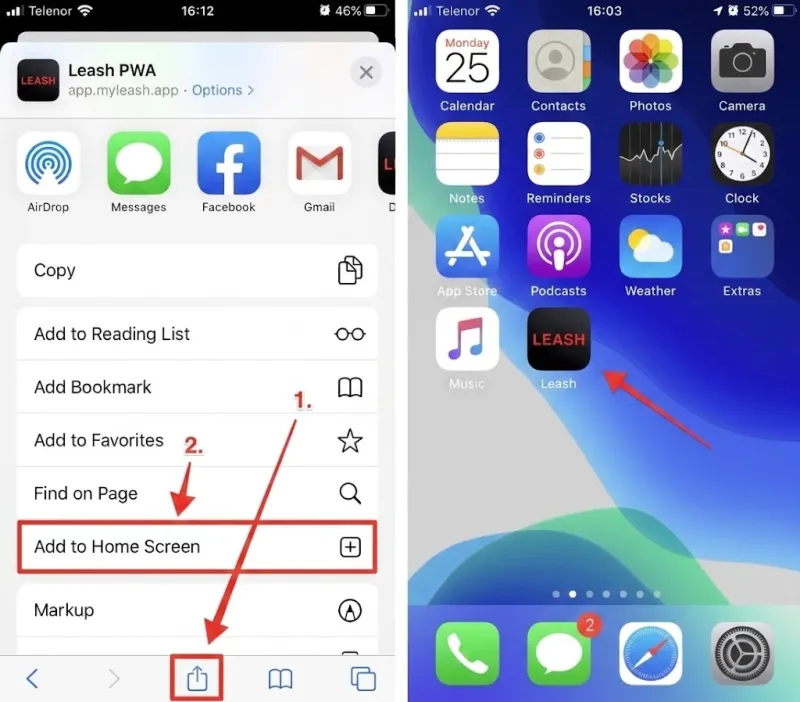
Important: You must use Safari. Chrome and Firefox on iOS do not support installing PWAs.
Install on Android
Automatic prompt
When you visit LEASH in Chrome, you may see an "Install app" banner at the bottom of the screen. Tap Install and you're done.
Manual method
If the banner doesn't appear:
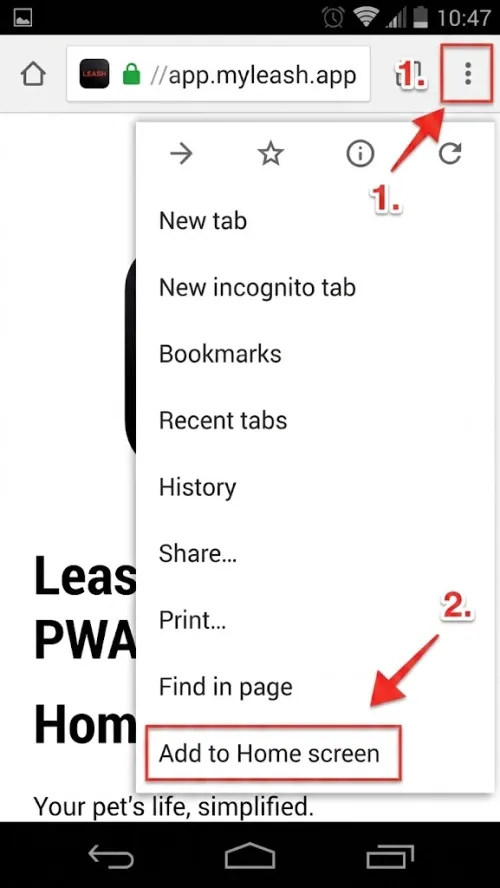
- Open Chrome and go to app.myleash.app
- Tap the three-dot menu (⋮) in the top-right corner
- Tap "Add to Home screen" or "Install app"
- Confirm by tapping "Install"
Already installed?
If you already see the LEASH icon on your home screen, you're all set. Make sure you're opening LEASH from the home screen icon (not from a browser bookmark) to get the full app experience.
Troubleshooting
- The install option doesn't appear? Make sure you're using Safari (iOS) or Chrome (Android). Other browsers may not support PWA installation.
- Notifications not working after install? You may need to grant notification permissions separately. See our Push Notifications guide.
- App looks different in the browser? Always open LEASH from your home screen icon for the intended experience.
Related
A complete profile gets more attention. Learn what to add for the best results.
An AI-powered audio interview every slave completes before accessing the marketplace. It proves you're serious.
Browse verified Mistress profiles, find who speaks to you, and apply to serve. For Mistresses: how your profile appears and how to attract slaves.
LEASH works on laptops and desktop computers. Open it in your browser or install it as a standalone app.